Mon, 29 Nov 2010 21:40:04 GMT
Under Windows, there has already been a driver for mounting Virtualbox VDIs under Windows, called ImDisk (which I have never tried). For Linux, there was a default method using losetup (which I also didnt try, because it sounded like these hacky solutions that often fail and break your whole virtual disk).
Anyway, meanwhile, Ubuntu has a package named virtualbox-ose-fuse, containing a tool called "vdfuse", which creates a fuse filesystem containing a file that can be loopmounted (the partitions are added, but I prefer kpartx).
The command is self-explaining and trivial to use, a little bit of configuration for fuse is necessary, but thats all. A pretty useful tool.
Anyway, meanwhile, Ubuntu has a package named virtualbox-ose-fuse, containing a tool called "vdfuse", which creates a fuse filesystem containing a file that can be loopmounted (the partitions are added, but I prefer kpartx).
The command is self-explaining and trivial to use, a little bit of configuration for fuse is necessary, but thats all. A pretty useful tool.
Show comments (Requires JavaScript, loads external content and cookies from Disqus.com)
Sun, 28 Nov 2010 21:29:34 GMT
Da das automatische Ausfüllen von Form-Data in Browsern gefährlich ist, weil man sie mit diversen exploits möglicherweise unbemerkt auslesen kann, wird hier das addon Secure Login für Firefox empfohlen. Sehr gut! Das war nämlich ein Feature von Opera, das ich vermisst habe.
Sun, 28 Nov 2010 15:57:05 GMT
I hate encodings. I dont understand why not everybody just uses utf-8, at least for data exchange. I really like Textonly-Software, running in an Xterm, but as soon as run into trouble with encodings, it is almost impossible to use it.
I tried Finch, CenterIM and Irssi+Bitlbee which I liked most and did best with encoding-problems, but all of them are sort of convenient, when you got used to them. But all of them have problems when special characters are sent.
All of them have settings for encodings, but I always run into trouble with them when using different terminal emulators. Its not just a few characters appearing in a strange way, it can lead to disappearing parts of the UI and make the terminal emulator not respond anymore to keystrokes.
Maybe the right way of handling encoding shit is not to try to do it right, but to try to do it good enough to work with it. For example, I would mostly be satisfied when I could at least tell them to just display everything as quoted printable, so at least the UI wouldnt be disturbed. Any maybe have a mode to display single characters as ascii-art.
I tried Finch, CenterIM and Irssi+Bitlbee which I liked most and did best with encoding-problems, but all of them are sort of convenient, when you got used to them. But all of them have problems when special characters are sent.
All of them have settings for encodings, but I always run into trouble with them when using different terminal emulators. Its not just a few characters appearing in a strange way, it can lead to disappearing parts of the UI and make the terminal emulator not respond anymore to keystrokes.
Maybe the right way of handling encoding shit is not to try to do it right, but to try to do it good enough to work with it. For example, I would mostly be satisfied when I could at least tell them to just display everything as quoted printable, so at least the UI wouldnt be disturbed. Any maybe have a mode to display single characters as ascii-art.
Thu, 25 Nov 2010 00:49:08 GMT
BASIC, the Beginner's All-Purpose Symbol Instruction Code, may not be the best tribe of programming languages, but it has brought a few programming languages that were quite nice for scriptkiddies.
For me, the main reason for using a computer was that I wanted to learn programming. And DOS had a QuickBasic-Interpreter, called QBasic. This interpreter had an excellent documentation, documenting most of the calls. This was perfect for me, since I didnt have to buy any book and could learn it myself by searching through the documentation, and could do my own experiments, and get my own expierience.
And it had a few example programs, like a Snake-game named "Nibbles", from which it was easy to "steal" code.
Though, it had a few drawbacks. For example, there are ASCII-Characters which couldnt be printed by its "Print"-Command. And there was no possibility to use the mouse. Later, I got a book about x86-assembler, which hat a table of MS-Dos-Interrupts. And I got a newer version, QuickBasic 4.5, which also had a compiler, and hat an instruction named Call Interrupt, which could be used to call MS-Dos-Interrupts. With that, I could write my own Print-Command that supported all characters, and could use the mouse. Later, when I finally got an internet connection, I found a lot of stuff, like the 3d-Game "Return To Marchfeld".
Still, there seem to be many people who like QBasic. Thats not surprising. Its a simple language with a lot of things the usual child wants to have. Many software and code can be found under my favourite site for that topic, QBasic.de (which is german, but should be quite understandable through google translate).
Well, meanwhile, all of this is not that interesting anymore. It is trivial to use the mouse, it is trivial to print every unicode-character, it is trivial to create 3d-images. But at that time, this was new to me. It was a nice world to explore, and I am not sure if such a thing still exists today, because most languages simply have default libraries for everything that can be done without further reading. And Basic seems dead to me, anyway - seems like some people still use Visual Basic, or VB Script, but the last time I saw it it was not even comparable to what QBasic was, at least in my opinion.
For me, the main reason for using a computer was that I wanted to learn programming. And DOS had a QuickBasic-Interpreter, called QBasic. This interpreter had an excellent documentation, documenting most of the calls. This was perfect for me, since I didnt have to buy any book and could learn it myself by searching through the documentation, and could do my own experiments, and get my own expierience.
And it had a few example programs, like a Snake-game named "Nibbles", from which it was easy to "steal" code.
Though, it had a few drawbacks. For example, there are ASCII-Characters which couldnt be printed by its "Print"-Command. And there was no possibility to use the mouse. Later, I got a book about x86-assembler, which hat a table of MS-Dos-Interrupts. And I got a newer version, QuickBasic 4.5, which also had a compiler, and hat an instruction named Call Interrupt, which could be used to call MS-Dos-Interrupts. With that, I could write my own Print-Command that supported all characters, and could use the mouse. Later, when I finally got an internet connection, I found a lot of stuff, like the 3d-Game "Return To Marchfeld".
Still, there seem to be many people who like QBasic. Thats not surprising. Its a simple language with a lot of things the usual child wants to have. Many software and code can be found under my favourite site for that topic, QBasic.de (which is german, but should be quite understandable through google translate).
Well, meanwhile, all of this is not that interesting anymore. It is trivial to use the mouse, it is trivial to print every unicode-character, it is trivial to create 3d-images. But at that time, this was new to me. It was a nice world to explore, and I am not sure if such a thing still exists today, because most languages simply have default libraries for everything that can be done without further reading. And Basic seems dead to me, anyway - seems like some people still use Visual Basic, or VB Script, but the last time I saw it it was not even comparable to what QBasic was, at least in my opinion.
Sat, 20 Nov 2010 23:48:47 GMT
Ich stelle gerade mit erschrecken fest, dass das Wohnhaus in dem ich wohne in Google Street View unkenntlich gemacht ist. Naja, ist ein großes Wohnhaus, und es reicht vermutlich ein Idiot besorgter Bewohner aus, damit es verpixelt werden musste.
Ist schon irgendwie peinlich, in einem solchen Haus zu wohnen. Üblicherweise gibt es keinen triftigen Grund, denn es ist nichts, was man nicht auch sehen könnte, wenn man einfach so auf der Straße vorbeifährt. Ein unkenntlich gemachtes Haus zeigt für mich also ziemlich deutlich, dass es in so einem Haus Personen gibt, die als Hauptinformationsquelle die Bild nutzen.
Ich warte schon auf die ersten Wertminderungen von Häusern, weil niemand in ein solches Haus ziehen will, wenn erstmal die Moralpanik vorbei ist.
Ist schon irgendwie peinlich, in einem solchen Haus zu wohnen. Üblicherweise gibt es keinen triftigen Grund, denn es ist nichts, was man nicht auch sehen könnte, wenn man einfach so auf der Straße vorbeifährt. Ein unkenntlich gemachtes Haus zeigt für mich also ziemlich deutlich, dass es in so einem Haus Personen gibt, die als Hauptinformationsquelle die Bild nutzen.
Ich warte schon auf die ersten Wertminderungen von Häusern, weil niemand in ein solches Haus ziehen will, wenn erstmal die Moralpanik vorbei ist.
Sat, 20 Nov 2010 17:56:15 GMT
As I am using bitlbee and quite a few autojoined irc-channels, irssi can get a lot less handy because of its many windows.
There are M-0 to M-9 to quickly navigate through the first 10 windows. M-a gets you to what irssi thinks that is the active window, but I want to control this myself. "/window 27" is a long command, that takes long to type.
So I decided to add a few aliases. I didnt want to write an irssi-script for it, and since I never had more than 100 windows, I just typed
$ i=0; while [[ $i -le 100 ]]; do echo /alias $i /window $i; ((i++)); done
in bash and pasted the output into irssi. Now I can acces windows via /<window_number>, i.e. /1, /27, /100. Nice.
There are M-0 to M-9 to quickly navigate through the first 10 windows. M-a gets you to what irssi thinks that is the active window, but I want to control this myself. "/window 27" is a long command, that takes long to type.
So I decided to add a few aliases. I didnt want to write an irssi-script for it, and since I never had more than 100 windows, I just typed
$ i=0; while [[ $i -le 100 ]]; do echo /alias $i /window $i; ((i++)); done
in bash and pasted the output into irssi. Now I can acces windows via /<window_number>, i.e. /1, /27, /100. Nice.
Thu, 18 Nov 2010 10:55:05 GMT

Thu, 11 Nov 2010 00:54:34 GMT
There are quite a lot of things that have to work together properly, to make a PXE-Boot-System work. If you really want a fully-qualified operating system, you will have to export a filesystem, for example via nfs, have a special kernel that can use this filesystem, and act as a dhcp-Server and NAT. It can be complicated to configure all this.
In a large network, you may want to have a fine-grained configuration of all of this. But usually, you are in a situation where some computer chooses to strike and you cant get any bootable medium. Well, surprisingly, still, the most safe way to get something to boot at least somehow is - besides burning a CD - to boot it via PXE-Boot, as far as I see. Maybe because this is some standard that most computers support (I am afraid that this will change as soon as the first routers that dont support IPv4 anymore will spread). So it would be desirable to have some software-package, that allows you to manually turn on an administrative dhcp-server on one of your ethernet-devices, with a linux-live-system that can install itself, such that you only have to plug in the computer you want to boot and then get a system to work with, and maybe to install directly.
There is a package that does something similar, namely ltsp-server-standalone, which create an LTSP-Architecture - but thats still not what I want. I want a bunch of servers and their configuration which I only have to turn on when I want it, and then "just work", passing a live-system (like on the ubuntu livecd) to all computers doing netboot, and routing internet connections.
It should be comparably easy to create such a thing (maybe it would take long to make it stable). In the end, there are a lot of howtos to achieve a Netboot-Livesystem. The parts are there, they only have to be put together.
In a large network, you may want to have a fine-grained configuration of all of this. But usually, you are in a situation where some computer chooses to strike and you cant get any bootable medium. Well, surprisingly, still, the most safe way to get something to boot at least somehow is - besides burning a CD - to boot it via PXE-Boot, as far as I see. Maybe because this is some standard that most computers support (I am afraid that this will change as soon as the first routers that dont support IPv4 anymore will spread). So it would be desirable to have some software-package, that allows you to manually turn on an administrative dhcp-server on one of your ethernet-devices, with a linux-live-system that can install itself, such that you only have to plug in the computer you want to boot and then get a system to work with, and maybe to install directly.
There is a package that does something similar, namely ltsp-server-standalone, which create an LTSP-Architecture - but thats still not what I want. I want a bunch of servers and their configuration which I only have to turn on when I want it, and then "just work", passing a live-system (like on the ubuntu livecd) to all computers doing netboot, and routing internet connections.
It should be comparably easy to create such a thing (maybe it would take long to make it stable). In the end, there are a lot of howtos to achieve a Netboot-Livesystem. The parts are there, they only have to be put together.
Tue, 09 Nov 2010 22:11:37 GMT
There is a lot of software I really dont like. And I often write about it. So I thought, maybe I should start writing about software I like. And well, there is actually plenty of it.
Well, one piece of software I really do like is Xvfb. It is an X-Server, drawing on a virtual framebuffer. X-Servers like Xvnc and Xrdp are basing on it, the pgo-compilation of Firefox I was using used it to run Firefox in a virutal X-Server, and it should be much more versatile, but maybe its too unknown.
To start it, like most X-Servers, just do
$ Xvfb -ac :1 &
Then lets start a Window-Manager and an Xterm
$ fvwm -display :1 &
$ xterm -display :1 &
Now we have a twm running with an xterm. W00t. But we cannot see anything yet. So lets kill the server again and restart it with a few more arguments:
$ Xvfb -ac :1 -shmem -fbdir /tmp/fbdir &
$ fvwm -display :1 &
$ xterm -display :1 &
Now, lets get a screenshot:
$ cp /tmp/fbdir/Xvfb_screen0 ./screenshot.xwd
$ convert screenshot.xwd screenshot.png
$ rm screenshot.xwd
we get a file "screenshot.png" looking like
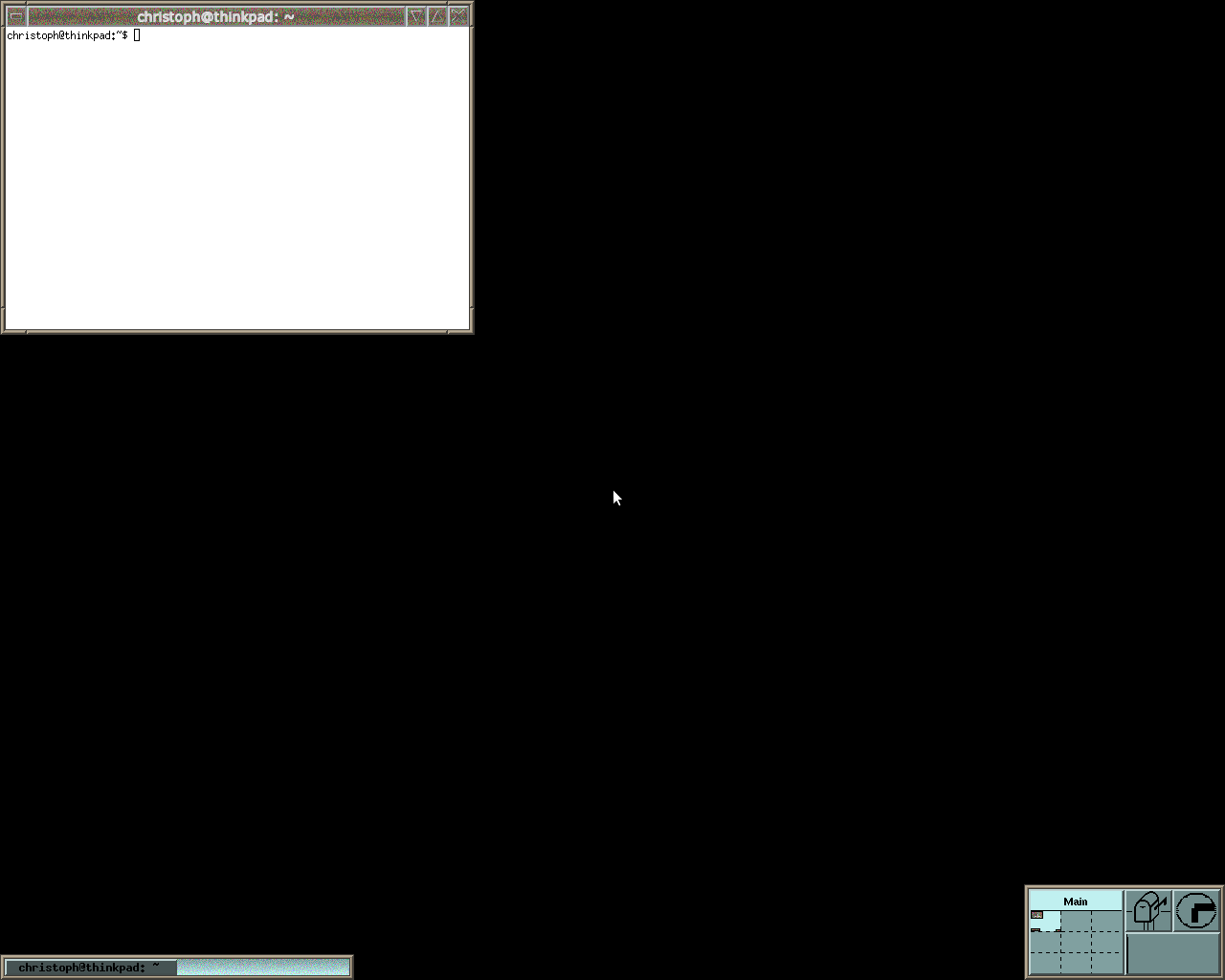
which looks like what we wanted to have. A fvwm with an xterm. Unfortunately, we cannot type anything inside it. And we cannot move the mouse. We have to use a trick here, and use the XTEST-Extension for Xvfb.
That is, kill Xvfb again, and run it with the XTEST-Extension:
$ Xvfb -ac :1 -shmem -fbdir /tmp/fbdir +extension XTEST &
$ fvwm -display :1 &
$ xterm -display :1 &
First, lets move the mouse on top of our xterm, since that is how to get the focus under fvwm in its default configuration, and then we can type in:
$ DISPLAY=:1 xdotool mousemove 100 100
$ DISPLAY=:1 xdotool type "apt-get moo"
$ DISPLAY=:1 xdotool key Return
And now lets get a screenshot like before
$ cp /tmp/fbdir/Xvfb_screen0 ./screenshot2.xwd
$ convert screenshot2.xwd screenshot2.png
$ rm screenshot2.xwd
Now our screenshot is
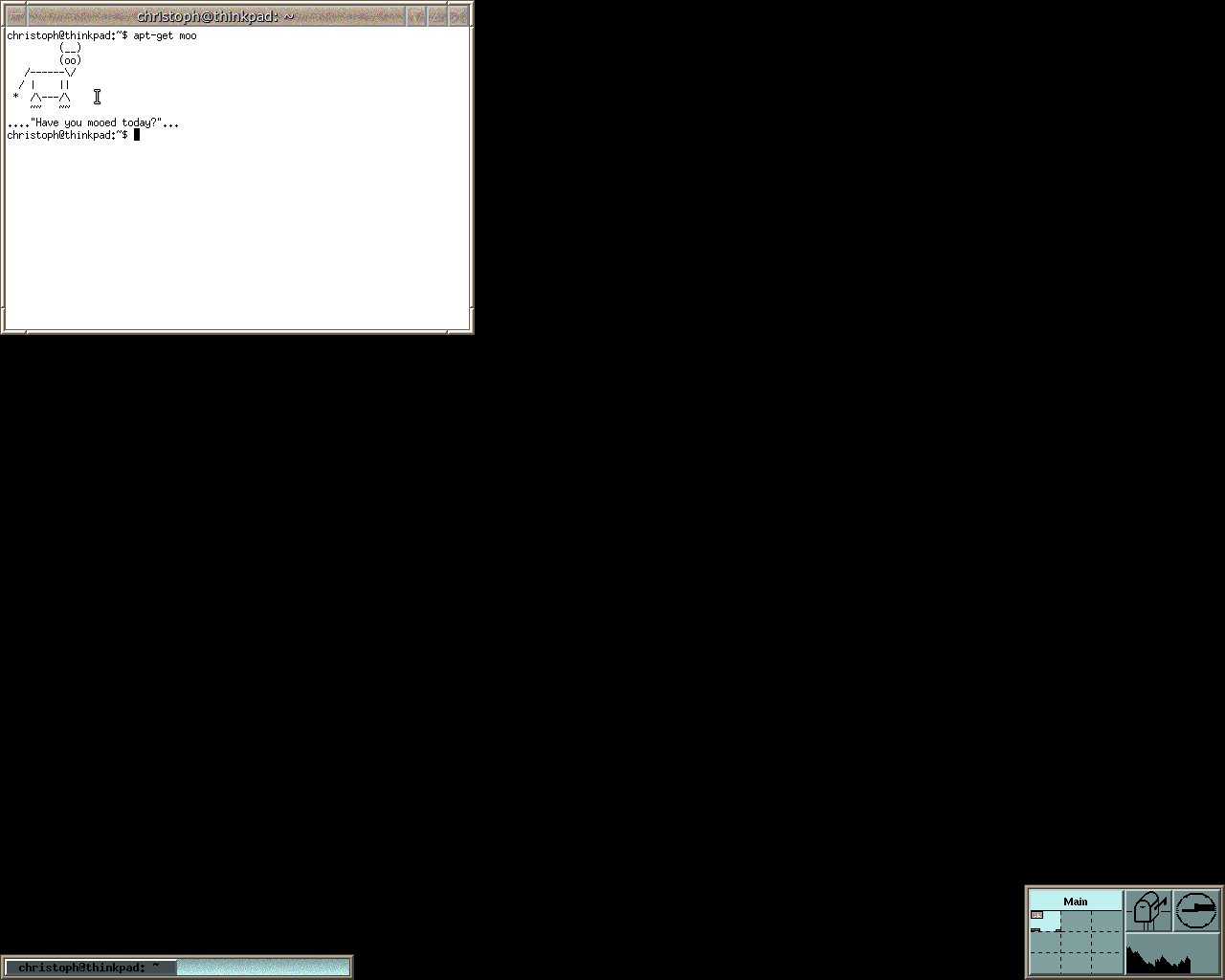
Well, its a bit more complicated than one would maybe want it. But compared to some other X11-Stuff, it is easy. And its very nice to have such a thing.
Well, one piece of software I really do like is Xvfb. It is an X-Server, drawing on a virtual framebuffer. X-Servers like Xvnc and Xrdp are basing on it, the pgo-compilation of Firefox I was using used it to run Firefox in a virutal X-Server, and it should be much more versatile, but maybe its too unknown.
To start it, like most X-Servers, just do
$ Xvfb -ac :1 &
Then lets start a Window-Manager and an Xterm
$ fvwm -display :1 &
$ xterm -display :1 &
Now we have a twm running with an xterm. W00t. But we cannot see anything yet. So lets kill the server again and restart it with a few more arguments:
$ Xvfb -ac :1 -shmem -fbdir /tmp/fbdir &
$ fvwm -display :1 &
$ xterm -display :1 &
Now, lets get a screenshot:
$ cp /tmp/fbdir/Xvfb_screen0 ./screenshot.xwd
$ convert screenshot.xwd screenshot.png
$ rm screenshot.xwd
we get a file "screenshot.png" looking like
which looks like what we wanted to have. A fvwm with an xterm. Unfortunately, we cannot type anything inside it. And we cannot move the mouse. We have to use a trick here, and use the XTEST-Extension for Xvfb.
That is, kill Xvfb again, and run it with the XTEST-Extension:
$ Xvfb -ac :1 -shmem -fbdir /tmp/fbdir +extension XTEST &
$ fvwm -display :1 &
$ xterm -display :1 &
First, lets move the mouse on top of our xterm, since that is how to get the focus under fvwm in its default configuration, and then we can type in:
$ DISPLAY=:1 xdotool mousemove 100 100
$ DISPLAY=:1 xdotool type "apt-get moo"
$ DISPLAY=:1 xdotool key Return
And now lets get a screenshot like before
$ cp /tmp/fbdir/Xvfb_screen0 ./screenshot2.xwd
$ convert screenshot2.xwd screenshot2.png
$ rm screenshot2.xwd
Now our screenshot is
Well, its a bit more complicated than one would maybe want it. But compared to some other X11-Stuff, it is easy. And its very nice to have such a thing.
Wed, 03 Nov 2010 01:16:18 GMT